
Advertisement
Click to download now, finish the installation quickly, and directly unlock the "all-round experience"
Advertisement
Screenshots
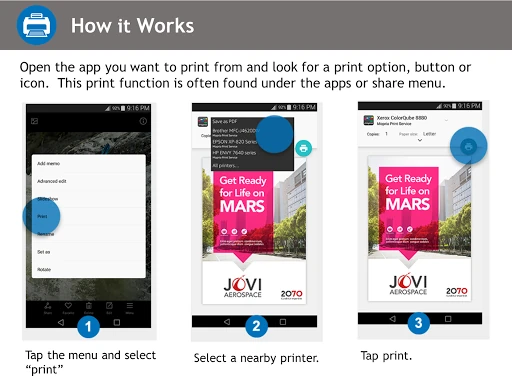
Click to download now, finish the installation quickly, and directly unlock the "all-round experience"
Mopria Print Service stands as a cornerstone utility within the Android Productivity landscape, serving as a universal driver that eliminates the need for brand-specific printing applications. By standardizing the communication between mobile devices and hardware, it provides a seamless, enterprise-grade printing solution. For professionals and casual users alike, it offers a reliable bridge between digital content and physical media, ensuring that mobile printing is as robust and configurable as desktop alternatives.
The user experience of Mopria Print Service is intentionally minimalist, prioritizing utility and background efficiency over visual flair. It functions primarily as a background system service, which is the gold standard for productivity tools intended to stay out of the user's way. The setup process is straightforward, and the print dialog menu adheres to modern UI standards, ensuring that even non-technical users can adjust complex settings like page ranges or media types without a steep learning curve.
While Mopria is highly functional, the integration could be enhanced by providing real-time printer status updates—such as low ink or paper jam alerts—directly within the mobile notification shade. Additionally, expanding the diagnostic toolkit to help users troubleshoot network discovery issues within the interface would significantly improve the experience for those dealing with complex Wi-Fi environments.
Mopria Print Service is an essential utility for any Android user who interacts with physical documents. It is particularly valuable for students and office professionals who require a reliable, multi-brand solution for printing on the go. If your printer is Mopria-certified, this service provides the most stable and feature-rich mobile printing experience available on the Google Play Store, effectively turning your smartphone into a mobile workstation.